In this article, we will guide you on managing your plugin’s license key and explain the duration of your support period. You’ll also learn how to update or extend your license key and take advantage of available discounts.
Your license key, which you receive upon purchasing the plugin, is essentially your purchase code. Each license is linked to a specific domain where your WordPress store is set up and the plugin is installed. If you need to reset or change the domain associated with your license key, continue reading for detailed instructions.
- Log into your account to manage your licenses
- Where can I find my purchase code?
- How do I reset my license?
1. Log into your account to manage your licenses
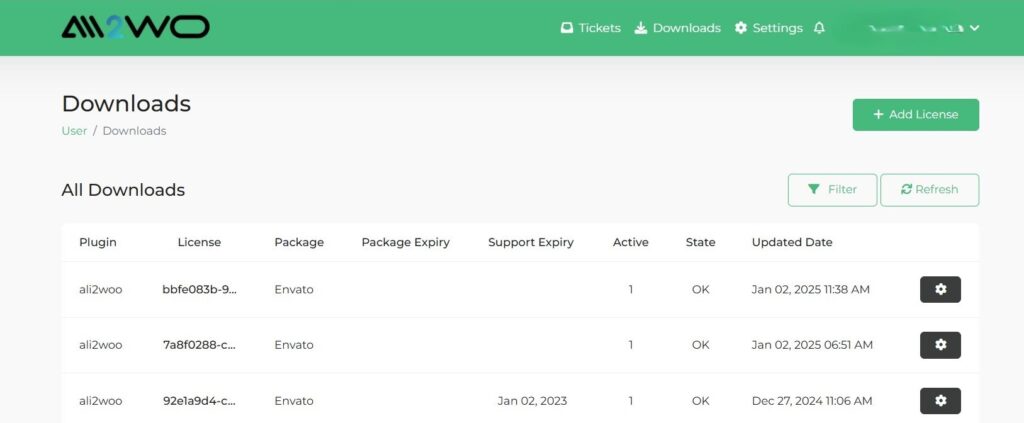
Before you start working with your purchase code, you need to log into your account. If you don’t have an account on our website, you will need to create a new one. Once you are logged in, go to the Downloads page (Account > Downloads). If you don’t see your license in the downloads table, click ‘Add License’ to add your license.
2. Where can I find my purchase code?
If you purchased a plugin on our website, your license code will be sent to you via email. If you purchased the item on CodeCanyon, please refer to their official article for guidance on locating your license.
3. How do I reset my license?
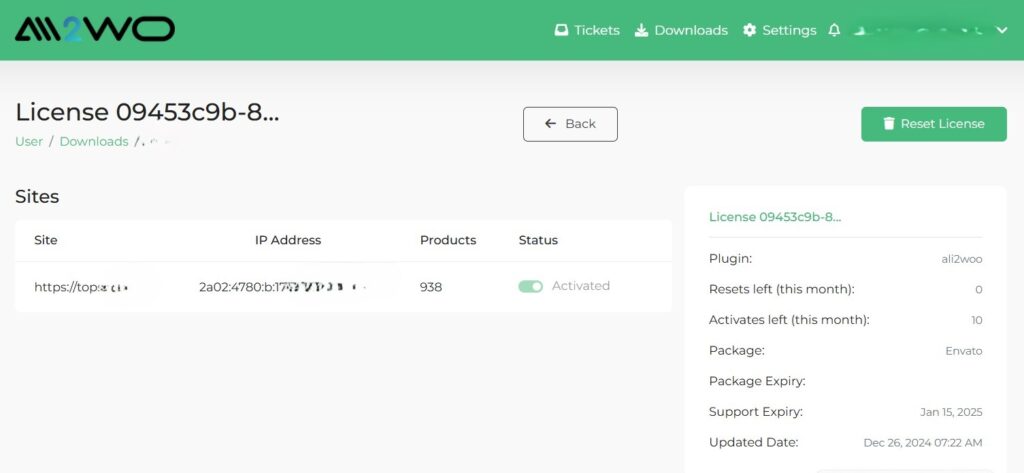
You can reset your license key through your account on support.ali2woo.com. Keep in mind that each purchase code should be assigned to only one domain. It cannot be used on multiple domains simultaneously unless you have a specific package that allows for multiple licenses.
If you wish to use your license on a different domain, follow these steps: first, uninstall the plugin from the current domain, then reset the license in your account. Finally, enter your purchase code in the plugin settings on the new domain.
Please note that the information about the sites associated with your license is cached and may be updated with a delay.
Purchase code is not added. Why my purchase code is not added?
Check this out my screenshot [ https://prnt.sc/yuls5f ]
Please check on the “Add purchase code” button
if you still have issues with that contact our support center.
Hello,
License does not get reset. When I press the reset button, it scrolls and refresh the page but nothing happens
We have updated the user accounts. Now the issue should be resolved.
I want to change the domain name, but I cannot reset my code
We have updated the user accounts. Now the issue should be resolved.
hi, why I already bought the Ali2woo, but still can not use it, why I can’t import the product with reviews
Hello, please check the following article in the plugin’s knowledge base:
https://help.ali2woo.com/codex/importing-reviews/
Bom Dia !
Ja fiz O procedimento .
(3. Como redefinir minha licença?)
Mas ainda nao aparece o meu (dominio) .
Ja esta instalado no novo dominio mas fica uma mensagem de erro .
Please send the request to our support center: https://support.ali2woo.com
Yesterday some problem begin.
I import products but they are stuck on draft status even I selected in the setting always publish status.
What should I do?
Check the following article, it should help you with your issue.
I have purchased the ALI2Woo version for $35.00 Is the ALI2Woo affiliated with NCH Software or ENVATO? I’m confused at this point. Please explain or advise.
We sell the Ali2Woo plugin on Codecanyon that is a part of the Envato marketplace.
I purchased the Ali2woo plug-in about a month ago. everything was working fine until yesterday it says Auth error: Purchase key, not valid or expired.
isn’t the license purchase a lifetime purchase?
It was a little glitch with Envato API. We have fixed that and now your key should work fine. If you still lexpierence such an issue, please contact our support center.
I purchased the Ali2woo plug-in about a month ago. everything was working fine until yesterday it says Auth error: Purchase key, not valid or expired.
I wrote to support and still nothing that responds and as it says in the previous post there is no talk of validity of the license
if you still have issues with that contact our support center.
even within the ali2woo support site, it is showing the following error
API Error: Rate limit exceeded. See https://build.envato.com/api/#rate-limit for documentation.
🤦🏻♂️🤦🏻♂️🤦🏻♂️🤦🏻♂️
Please contact our support center: https://support.al2woo.com
Searching for products through the Ali2Woo plugin returns the following:-
[1002]Build request error
Working okay until yesterday.
We’ve restore all plugin functions a week ago, only import product reviews and in-built search will be resorted later (in a 2 weeks)
Have you guys changed something?
I used to be able to disconnect a website by removing the VI mark from its connection page in the chrome extension. What is this reset button and what does it means “purchase code reset left: 5”
Thank you.
We don’t change anything. Just has a limit of resets to 5 to prevent overloading our server.
If you want to reset domain which you your purchase code, just use that button.
i purchase this plugin codecaneyaon and also i use this plugin first my demo site now i need use my premium domain so how can i reset my license???
In this article we describe the process on how to reset domain.
where is article link? please provide me link
You leave your comment in this article. Please check it carefully:
https://help.ali2woo.com/codex/license-management/
I already mention i purchase this plugin codecanyon — so where is reset option? https://prnt.sc/iIXbdQORUBRu — check this screenshot please
please deactive license this domain. https://web-creation.co/affiliate/ — this is my demo site
Please give me a solution
please deactive license this domain. https://web-creation.co/affiliate/ — this is my demo site
Please don’t use reviews section in order to get a support. If you need a help, please contact our support center instead
It seems i’ve activated the license on an old email from 2023. I can’t create a ticket to get support to reset my domain license.
Hello, we have updated our support center about a half year ago Please create a new account there:
new support center