You can automate order placement using the official AliExpress API, which is currently the most efficient method. To begin:
First, input your purchase code within the plugin’s settings. Then, you must retrieve an access token from the AliExpress portal. This token serves as a critical link, authorizing the plugin to interact securely with your AliExpress account via their API.
Links for quick navigation in this article:
- How to Get Your AliExpress Access Token
- How to Place Orders Using the AliExpress AP?
- How to Place Orders with Brazilian or Chilean Addresse?
- How to Sync Orders via the AliExpress AP?
- How to Change an Order Shipping Addres?
- How to Re-submit an Order
How to Get Your AliExpress Access Token
You have to get the Access token otherwise the feature will not work. This is requirement of AlIExpress platform.
We described the process in the separate article, the process includes just a few steps.
How to Place Orders Using the AliExpress API
Once you have a valid access token (as outlined in the previous section), you can begin placing orders automatically.

Steps to Place Orders:
1. Initiate Fulfillment
Go to WooCommerce > Orders. You can place a single order by clicking the green button next to it, or select multiple orders to process them in bulk.

2. Configure & Confirm
A fulfillment confirmation popup will appear. Here, you can review and change the shipping method for any order if needed, though the preselected options are typically fine. Click “Fulfill orders automatically” to proceed.
3. Monitor the Process
The plugin will now place your orders via the API. This usually takes 2-3 seconds per order, depending on your internet speed.
4. Check the Results
Once complete, a status will appear next to each order:
- “Done” means the order was successfully placed on AliExpress.
- If you see an error (e.g., “incorrect address,” “no purchase key”, “expired access token”), resolve the issue and try again.
5. Complete Payment
After successful placement, click the “Pay for order(s)” button. This will open your AliExpress pending orders page in a new browser tab, where you can finalize payment for all orders in bulk or individually.

How to Place Orders with Brazilian or Chilean Addresses
Orders shipped to Brazil or Chile require a CPF (Brazil) or RUT (Chile) tax ID in the shipping information. Our plugin supports this by allowing you to map these custom fields in the settings.
Step 1: Create the Required Tax ID Fields
By default, WooCommerce does not include CPF or RUT fields in the checkout form. To add them, you must use a third-party plugin:
- For Brazilian CPF, a popular option is the “Brazilian Market on WooCommerce” plugin.
- For Chilean RUT, search the WordPress plugin directory for a compatible “RUT field” plugin.
Step 2: Map the Custom Fields in Our Plugin
These third-party plugins save the CPF/RUT data as custom order meta fields. To connect them:
- Contact the third-party plugin’s support or check its documentation to confirm the exact meta field key it uses (e.g.,
_billing_cpf). - In our plugin’s settings, enter these keys into the dedicated “CPF Meta Field” and “RUT Meta Field” options.
Example:
If using the “Brazilian Market” plugin, it typically uses _billing_cpf as the meta key. You would simply enter _billing_cpf into the “CPF Meta Field” setting in our plugin.
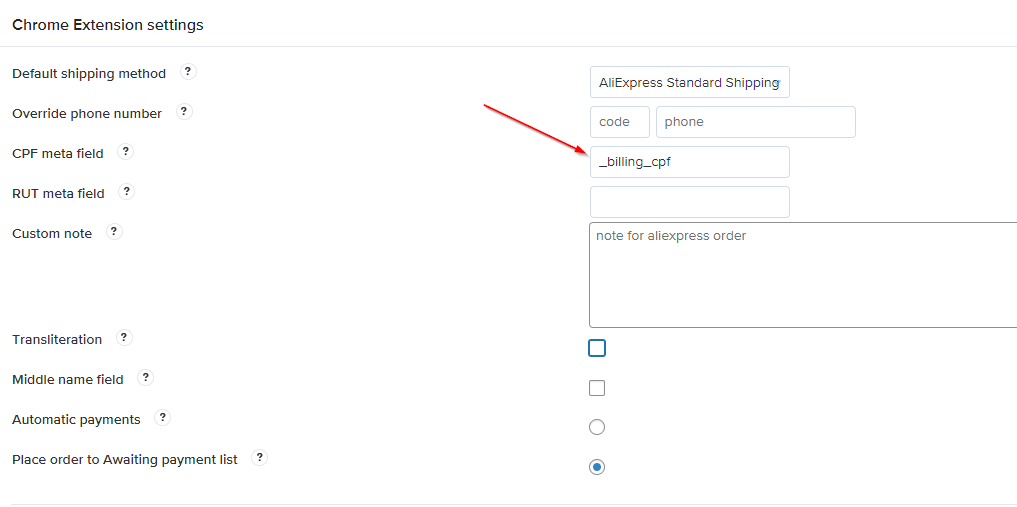
Once mapped, the CPF or RUT data will be included automatically when fulfilling orders to these countries.
How to Sync Orders via the AliExpress API
To synchronize order status and tracking, you must first have a valid AliExpress access token configured. This token authenticates your account and allows the plugin to sync any orders placed through it.
For detailed setup and step-by-step instructions, please refer to our dedicated guide on order synchronization.
How to Change an Order Shipping Address
If an order fails due to an invalid shipping address, an error will appear in the confirmation popup.
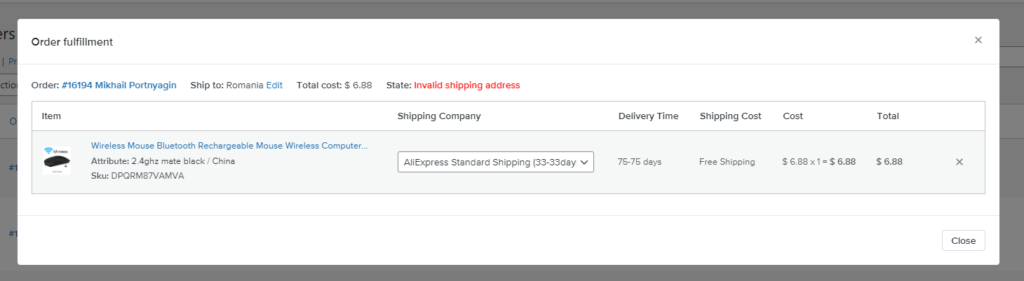
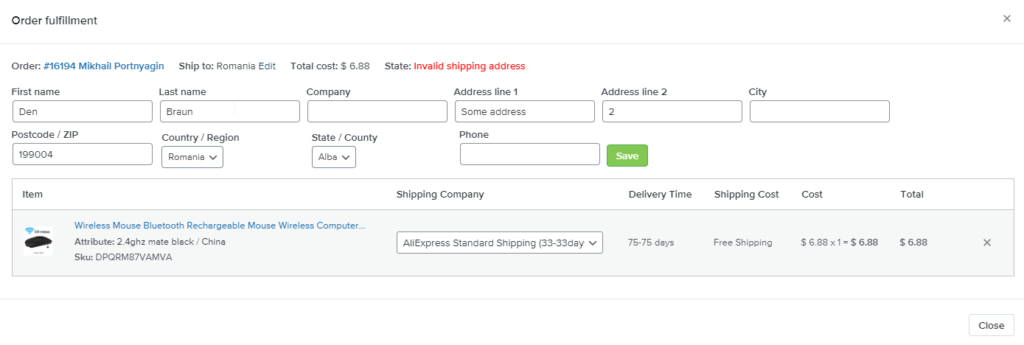
To resolve this:
- Click the “Edit” button (visible next to the “Ship to” field).
- In the edit popup, update the incorrect address details.
- Click “Fulfill orders automatically” again to retry the placement.
How to Re-submit an Order
To place an order again, you must first clear its existing AliExpress order ID.
- Go to the WooCommerce order’s edit page.
- Locate and click the “Reset A2W Order Data” button.
- This will remove the stored AliExpress order ID, allowing you to re-attempt the fulfillment process as if it were a new order.
Hi There I have changed the address several times but still keep getting the “invalid shipping address” I have also gone to aliexpress to update shipping it does not seem to work. is there another solution?
Hello, when using Aliepxress API to fulfill the order, the customer data is transmitted directly to Aliexpress order page to fulfill, also the data is not affected or proceeded by our plugin.
Orders functionality uses the official API of AliExpress which only accepts unaccented Latin characters in shipping addresses so please use the chrome extension to fulfill orders whose address(including customer’s name) contains: – Non-Latin characters – Accented words that affect the address if their accents are removed Please try our recommendation in fulfilling using the Chrome extension in this case to see if the problem is solved.
Did you ever fix this problem? I’m having the same issue.
Please contact our support center: https://support.al2woo.com
Le lien n’est pas valide 🙂
Let us know if you have further questions
Why does a placed and fulfilled order not have ID # or Tracking # in the order editing page?
Once you placed the order on AliExpress using API, the order ID is saved to the order and you can find it on the order editing page too. The tracking number will appear when two conditions are met: you synchronize such an order with AliExpress and your supplier (saliexpress seller) added the tracking number to the order on AliExpress.
Thank you for your order. We are processing it now.
I can’t add my website for some reason.
I’m living in Thailand. I can’t register as a seller. Can I get AliExpress API?
Please contact our support center.
I am getting errors and errors, I am frustated.
Please contact our support center: https://support.al2woo.com
Fixed. Thanks
Isn’t there any way to put total_cost in the table next to the AliExpress Order ID? Or insert it somewhere in custom fields? Because in Brazil we need the cost of the order to make the invoice to pay the taxes.
Hello, yes, sure we can add such a feature, could you send the feature request to our support center:
https://support.ali2woo.com
I got error:
ERROR_WHEN_BUILD_FOR_PLACE_ORDER
When use:
aliexpress.trade.buy.placeorder
Hello, we have fixed that error. You have to updated the plugin to latest version.
The operation is failed!
You need to use a correct API Key.
Please make sure that you get AliExpress or if you have one, try to regenerate it.
Please check the following article: https://help.ali2woo.com/codex/how-to-get-access-token-from-aliexpress/
The same problem.
In fulfill button this error:
Invalid shipping address. Inserisci 9 o 10 carachter.
When our plugin places an order on AliExpress, it should match your customer shipping address (you have in WooCommerce order) with AliExpress portal address.
If it’s not possible, you different kind of errors with the tip.
Try to fill the same address on AliExpress using their built-in address autocomplete form and it should help you to find a error.
Or you can contact our support center.